Monday, 23 September 2013

Wordpress Admin Plugin Creation, Wordpress admin value listing pluign

<?php
session_start();


 /*
        Plugin Name: manoj_create_menu
        Plugin URI: http://mcamady.blogspot.com/#
        Description: created by Manoj Agarwal.
        Author: Manu Agarwal


       */
     
               
add_action('admin_menu', 'manoj_create_menu');
function manoj_create_menu() {
    //create new top-level menu
    add_menu_page('Payment History', 'Payment History', 'administrator', __FILE__, 'baw_settings_page',plugins_url('/images/icon.png', __FILE__));
    //call register settings function
    add_action( 'admin_init', 'register_mysettings' );
}
function register_mysettings() {
    //register our settings
    register_setting( 'manoj-settings-group', 'new_option_name' );
    register_setting( 'manoj-settings-group', 'some_other_option' );
    register_setting( 'manoj-settings-group', 'option_etc' );
}

function username($userid)
{
$query=mysql_query("select * from register where user_id='$userid' ");
$row=mysql_fetch_array($query);
return $row['user_name'];

}
function usermail($userid)
{
$query=mysql_query("select * from register where user_id='$userid' ");
$row=mysql_fetch_array($query);
return $row['user_email'];

}

function baw_settings_page() {
?>
<script src="http://ajax.googleapis.com/ajax/libs/jquery/1.10.1/jquery.min.js">
</script>

<script src="jquery.tablePagination.0.5.js">
</script>
<script type="text/javascript">
$(document).ready(function() {

$('table').tablePagination({});

});
</script>
<style>
td {
            border: 1px solid black;
          }


          #testTable {
            width : 350px;
            margin-left: auto;
            margin-right: auto;
          }
         
          #tablePagination {
            background-color: #DCDCDC;
            font-size: 0.8em;
            padding: 0px 5px;
            height: 20px
          }
         
          #tablePagination_paginater {
            margin-left: auto;
            margin-right: auto;
          }
         
          #tablePagination img {
            padding: 0px 2px;
          }
         
          #tablePagination_perPage {
            float: left;
          }
         
          #tablePagination_paginater {
            float: right;
          }

</style>
<script>
function showUser(str)
{
if (str=="")
  {
  document.getElementById("txtHint").innerHTML="";
  return;
  }
if (window.XMLHttpRequest)
  {// code for IE7+, Firefox, Chrome, Opera, Safari
  xmlhttp=new XMLHttpRequest();
  }
else
  {// code for IE6, IE5
  xmlhttp=new ActiveXObject("Microsoft.XMLHTTP");
  }
xmlhttp.onreadystatechange=function()
  {
  if (xmlhttp.readyState==4 && xmlhttp.status==200)
    {
    document.getElementById("txtHint").innerHTML=xmlhttp.responseText;
    }
  }
xmlhttp.open("GET","deletetag.php?q="+str,true);
xmlhttp.send();
}
</script>


<div class="wrap">
<br/><br/><br/>

<h2>Payment History</h2>
<p>&nbsp;</p>
<script>
function showHint(str)
{
if (str.length==0)
  {
  document.getElementById("txtHint").innerHTML="";
  return;
  }
if (window.XMLHttpRequest)
  {// code for IE7+, Firefox, Chrome, Opera, Safari
  xmlhttp=new XMLHttpRequest();
  }
else
  {// code for IE6, IE5
  xmlhttp=new ActiveXObject("Microsoft.XMLHTTP");
  }
xmlhttp.onreadystatechange=function()
  {
  if (xmlhttp.readyState==4 && xmlhttp.status==200)
    {
    document.getElementById("txtHint").innerHTML=xmlhttp.responseText;
    }
  }
xmlhttp.open("GET","gethint.php?q="+str,true);
xmlhttp.send();
}
</script>
<p><strong>Enter the txn reference no.</strong></td><td><input type="text" name="search" onkeyup="showHint(this.value)" /></p>
<br/><br/>
<span id="txtHint">
<?php $result = mysql_query("SELECT * FROM payments  ");


        echo "<table  width='100%' border='1' cellspacing='0' cellpadding='2' id='menuTable'>";
       echo "<thead>
<tr>
       <th align='center' bgcolor='#EAEAEA' class='box-txt' style='background-color:#d7d7d7;'>Order Ref.</th>
      
       <th align='center' bgcolor='#EAEAEA' class='box-txt' style='background-color:#d7d7d7;'>Order Amount</th>
       <th align='center' bgcolor='#EAEAEA' class='box-txt' style='background-color:#d7d7d7;'>Order Date</th>
       <th align='center' bgcolor='#EAEAEA' class='box-txt' style='background-color:#d7d7d7;'>User-Name</th>
         <th align='center' bgcolor='#EAEAEA' class='box-txt' style='background-color:#d7d7d7;'>User-Email</th>
         <th align='center' bgcolor='#EAEAEA' class='box-txt' style='background-color:#d7d7d7;'>Order Status</th>
       
      
       </tr></thead>";
        // loop through results of database query, displaying them in the table
 while($row=mysql_fetch_array($result))
 {
       
                // echo out the contents of each row into a table
                echo "<tr>";
                echo '<td align="center" bgcolor="#FFFFFF" class="box-txt">' . $row['txnid'] . '</td>';
                
                 echo '<td align="center" bgcolor="#FFFFFF" class="box-txt">$'.$row['payment_amount']. '</td>';
                 echo '<td align="center" bgcolor="#FFFFFF" class="box-txt">'.$row['createdtime'] . '</td>';
               
                  echo '<td align="center" bgcolor="#FFFFFF" class="box-txt">' .username($row['payer_id']) . '</td>';
                  echo '<td align="center" bgcolor="#FFFFFF" class="box-txt">' . usermail($row['payer_id']) . '</td>';
                   echo '<td align="center" bgcolor="#FFFFFF" class="box-txt">' . $row['payment_status'] . '</td>';
               
           
                echo "</tr>";
      
        // close table>
     
       
        }
          echo "</table>";
       
        }
       
       
        ?>


</span>


</div>

htaccess for security in php

.htaccess setting for security


PHP.INI

AddType application/x-httpd-php .dhtml

allow_url_fopen = off

expose_php = off

magic_quotes_gpc = off

magic_quotes_sybase = off

register_globals = off


.HTACCESS
AddType x-mapp-php4 .html .htm .shtml

Options -Indexes

<Files *.ini>
Order deny,allow
Deny from All 
</Files>


SQL Injection in PHP


Basic SQL Injection Attack
Hi Guys, Here Im going to teach you about the SQL injection. It is one of the great vulnerabilities in most of the sites. But still most of the developers are not aware of it. It a good new for us guys, we can hacksome sites very easily.
What is SQL injection..? How it works..?
Sql Injection
Sql Injection
Dont worry Its just a simple thing.
Sql injection attacks the database through the Website. And if you know .net you can know more about this. When you creating a site and save your datas in a database using SQL queries, as a newbies you  can make a lot of mistakes in that. As a result of this even a single mistake shows the SQL error.
Sql Injection
Sql Injection
Same thing here too… What we have to do is use some invalid inputs like ( ‘”><=*) etc.. to create some errors in the database. If it show some error, then we are moving forward guys.
If you dont understand the above don’t worry thats just a theory to say how it works,
Now read it carefully..
Step 1 : First thing you have to do is, select a website that containing the url at the end
.php?id=1
Example : http://www.hackingstuffs.com/items.php?id=5
Step 2 : check weather the site is vulnerable or not. How to check..?
Use single quote ( ‘ ) mark at the end of the url.
Example : http://www.hackingstuffs.com/items.php?id=5′;
If if doesn’t show any error then leave it. search for other site.
If it shoes some errors like ( syntax error) or (error on line table_name or any thing )
You are lucky.. This site is vulnerable.
Step 3 : you have to find the login page, its some what difficult but if you find it then you can do many funny things on that site like (edit, delete, add etc)
First try it manually..
Sql Injection
Sql Injection
Guess what may be the admin page like (login, admin, admin-login,admin_login) try like this.
If you get any login form then you are going in a right direction..
or else to find the login page you can use the Havij tools also. But using tools will not be interest to hack..
When you find the login page, open a new tab and open google.com,
In the search box type ” SQL Cheat Sheet “, you can get a lot of urls and open one link and copy the code from that and paste in Username & password box.
And press login button, Oh God its so crazy you are inside the website…
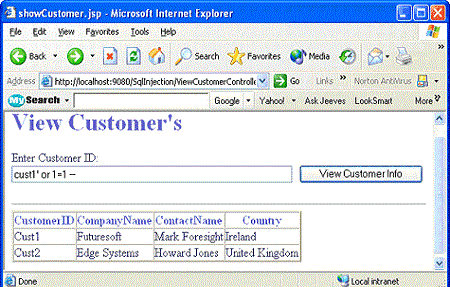
No need to go to google I will provide some SQL Injection codes try on this most of the admin page will bypass in this codes..
1.)      1′ OR ’1′=’1
2.)      1 OR 1=1
3.)      1’1
4.)     1 AND 1=1
5.)     1 EXEC SP_ (or EXEC XP_)
6.)     1′ AND 1=(SELECT COUNT(*) FROM tablenames); –
In the login page copy any of the code from here and paste it in both username & password. And click thelogin button. Try the first one, if its not login try for others or go to google.
Now Guys you are in the admin page of the website, So you can do any thing you want. You delete, edit etc, youy have the permit to do ever thing.
You can use insert table, detele table, insert coloumn, drop coloumn etc.
Sql Injection
Sql Injection
Now I hope you guys undersand the SQL Injection Attack. And any newbies have doubt use the comment options below, lot of peoples are ready to clear your doubts..
But Guys you have to think once that hacking into others site is cyber crime and the punishment will be very severe. This is just to increase your knowledge and the Article is only for Security purpose so be aware of it. Before doing this.

Saturday, 21 September 2013

IP Tracker

IP Locator also known as IP Lookup Tool

Using an IP lookup service you can find the whereabouts of a computer or router, the owner and the name of the computer.

For example, you can use IP Address Lookup to make sure an individual is located where they say they are in order to avoid fraud.

It is sometimes useful to know whether somebody is contacting you from the USA, the UK, Nigeria or China for example. Our IP Address Locator tool is the right tool to know IP location from any IP address or Domain.

IP Lookup to Locate Location and Lookup IP Addresses

With our IP lookup tool also known as IP Locator you can find Domain, IP address location and additional information's from any IPv4 address or Domain.
If you are looking for domain lookup and would like to find out WHOIS owner of any domain name then is our Whois Lookup tool very powerful way which will give you all informations about owner of domain or any IPv4 and IPv6 address.

Lookup IP address and Lookup Domain now with our free IP Locator.

Use this URL for tracking

how to catch the hacker is coming from using php

how to catch the hacker is coming from using php ? is a big question but if you find the result will only one
We have the script which can scan your php website have virus or not and if have where is it,

Tracking of hacker is very big deal if you can find where he/she is coming you can block that, we have script to catch the hacker and protection script that you can apply in your site and bug/virus free,

Contact Now before hacker will destroy your site.

Find country name and city using ip address in php

Hello Friends use this code for get

$ip=$_SERVER['REMOTE_ADDR'];
 $addr_details = unserialize(file_get_contents('http://www.geoplugin.net/php.gp?ip='.$ip));
 $city = stripslashes(ucfirst($addr_details[geoplugin_city]));
 $countrycode = stripslashes(ucfirst($addr_details[geoplugin_countryCode]));
 $country = stripslashes(ucfirst($addr_details[geoplugin_countryName]));

PHP GeoIPLocation Library


  • PHP GeoIPLocation Library by Chirag Mehta is a single PHP file that will let you determine the country of location for any given IP address.
  • GeoIPLoc does not require any large database tables, flat text files, or any special configuration on your server. Using GeoIPLoc is as easy as calling the getCountryFromIP() function with any IP address of the form 'x.x.x.x' where 'x' is any integer between 0 and 255.
  • The library is automatically updated once a day by downloading the free IP address database from Software77.net. The auto-generation utility then sorts and compacts the data in the most efficient way to reduce the size of the resulting PHP file.


  • Additionally, the library uses a rudimentary caching algorithm that drastically speeds up batch querying of IP addresses, e.g. while parsing browser access logs.


  • Download this: PHP GeoIPLocation Library - 230kb (automatically updated daily)

    Usage

    1. Download PHP GeoIPLocation Library from the link above.
    2. Extract geoiploc.php to any folder on your server that is accessible by a web browser.
    3. Include the "geoiploc.php file and call getCountryFromIP() function with any IP address.
    4. View the sample code below for more details.

    Sample Code


    <?php

      
    include("geoiploc.php"); // Must include this

      // ip must be of the form "192.168.1.100"
      // you may load this from a database
      
    $ip $_SERVER["REMOTE_ADDR"];
      echo 
    "Your IP Address is: " $ip "<br />";

      echo 
    "Your Country is: ";
      
    // returns country code by default
      
    echo getCountryFromIP($ip);
      echo 
    "<br />\n";

      
    // optionally, you can specify the return type
      // type can be "code" (default), "abbr", "name"

      
    echo "Your Country Code is: ";
      echo 
    getCountryFromIP($ip"code");
      echo 
    "<br />\n";

      
    // print country abbreviation - case insensitive
      
    echo "Your Country Abbreviation is: ";
      echo 
    getCountryFromIP($ip"AbBr");
      echo 
    "<br />\n";

      
    // full name of country - spaces are trimmed
      
    echo "Your Country Name is: ";
      echo 
    getCountryFromIP($ip" NamE ");
      echo 
    "<br />\n";?>


    OR Use this Function


    1. function countryCityFromIP($ipAddr)
    2. {
    3. //function to find country and city from IP address
    4. //Developed by Roshan Bhattarai [url]http://roshanbh.com.np[/url]
    5. //verify the IP address for the
    6. ip2long($ipAddr)== -1 || ip2long($ipAddr) === false ? trigger_error("Invalid IP", E_USER_ERROR) : "";
    7. $ipDetail=array(); //initialize a blank array
    8. //get the XML result from hostip.info
    9. $xml = file_get_contents("http://api.hostip.info/?ip=".$ipAddr);
    10. //get the city name inside the node <gml:name> and </gml:name>
    11. preg_match("@<Hostip>(\s)*<gml:name>(.*?)</gml:name>@si",$xml,$match);
    12. //assing the city name to the array
    13. $ipDetail['city']=$match[2];
    14. //get the country name inside the node <countryName> and </countryName>
    15. preg_match("@<countryName>(.*?)</countryName>@si",$xml,$matches);
    16. //assign the country name to the $ipDetail array
    17. $ipDetail['country']=$matches[1];
    18. //get the country name inside the node <countryName> and </countryName>
    19. preg_match("@<countryAbbrev>(.*?)</countryAbbrev>@si",$xml,$cc_match);
    20. $ipDetail['country_code']=$cc_match[1]; //assing the country code to array
    21. //return the array containing city, country and country code
    22. return $ipDetail;
    23. }

    Check ip address coming from country using php

    $json = file_get_contents('http://freegeoip.appspot.com/json/66.102.13.106');
    $expression = json_decode($json);
    print_r($expression);
    
    
    stdClass Object
    (
        [status] => 1
        [ip] => 66.102.13.106
        [countrycode] => US
        [countryname] => United States
        [regioncode] => CA
        [regionname] => California
        [city] => Mountain View
        [zipcode] => 94043
        [latitude] => 37.4192
        [longitude] => -122.057
    )
    To get countryname
    echo $expression->countryname;
    Result
    United States

    Friday, 20 September 2013

    PHP Website Security Expert


    Web Security System Website Security Systems 

     Website Security Systems is very important for a webmaster. 
     If a webmaster to ignore the security aspect of a website, the website will be very vulnerable to attacks from a hacker.
    To strengthen the web of security in terms of knowledge about web security systems needed to be overcome.

    Web Security System Web hacking

    Web hacking is usually done through port 80. Because the website using port 80. The attacks are usually carried out are: 
    • Deface Site
     • SQL Injection
     • Remote File Inclusion (RFI)
     • Local File Inclusion (LFI) 
    • Cross Site Scripting (XSS)  

    Web Security System Deface Site 

    • Deface is an activity to change the front page (index) or the content of a Web site or its contents so that the view in accordance with the desired.  

    Web Security System The techniques of web site Deface
     • Generally the amount of deface can be done in 3 ways:
       1. Generally speaking, Enter Illegal Input. The aim is that the user was thrown out of the directory files and go to the web server root directory and then run the cmd.exe and observing the structure of the target directory on the NT server.
    2. With TFTP (Trivial File Transfer Protocol) is a UDP based protocol which listen on ports 69 and is very susceptible safety and most web servers running this TFTP service. 3. With the FTP with a web that has been filled deface materials. Each NT server has ftp.exe file upload to FTP or FTP downloads. 

    Web Security System Netcat 

    • Netcat allows you to form their own port filter that allows file transfers without using FTP. Furthermore, netcat can be used to avoid the port filters on most firewalls, spoofing IP address, to conduct session hijacking
    Web Security System Securing IIS Server from Deface
     • Always updating with the latest service packs and the latest hotfix
    . • Protect with a firewall and IDS (Intrusion Detection System).
     • Eliminating Options Write on the HTTP protocol (HTTP 1.0 and HTTP 1.1). 
    • Commands supported are: CONNECT*, DELETE*, GET, HEAD, OPTIONS, POST, PUT, TRACE  

    Web Security System SQL Injection 

    • SQL injection attack is one attack to reach access to the database system based on Microsoft SQL Server
     • These techniques take advantage of weaknesses in the programming language in SQL scripting in processing a database system that allows someone without an account can enter and pass the verification of the MS SQL Server.  

    Web Security System SQL Injection For handling this case is set to: 
     • Only certain characters may be inputted. • If the illegal character is detected, immediately rejected the request.  

    Web Security System Remote File Inclusion (RFI) 

     • Methods that exploit the weaknesses of PHP scripts include (), include_once (), Require (), require_once () the variable is not declared properly.
     • With RFI an attacker can either include a file that is located outside the respective servers. 

    Web Security System Local File Inclusion (LFI) 

     • Methods that exploit the weaknesses of PHP scripts include (), include_once (), Require (), require_once () the variable is not declared properly
    . • With LFI an attacker can either include a file that is located on the server concerned.  

    Web Security System Cross Site Scripting (XSS)

     • XSS also known as the CSS is an acronym for Cross Site Scripting.
     • XSS is a method to insert HTML or script code into a website that is run through a browser on the client.